> ## Documentation Index
> Fetch the complete documentation index at: https://docs.gomaestro.org/llms.txt
> Use this file to discover all available pages before exploring further.
# Query Dogecoin UTxOs
> Tutorial guide to query Dogecoin UTxO information by address using Maestro's Blockchain Indexer API for wallet management and transactions.
**Get UTxO details on Dogecoin**
In this guide, you will learn to query Dogecoin and extract UTxO information by leveraging the [UTxOs by Address](/dogecoin/blockchain-indexer-api/addresses/utxos-by-address) endpoint.
## Prerequisites
Before submitting an API request, ensure you have completed the following:
* [Create an Account](https://dashboard.gomaestro.org)
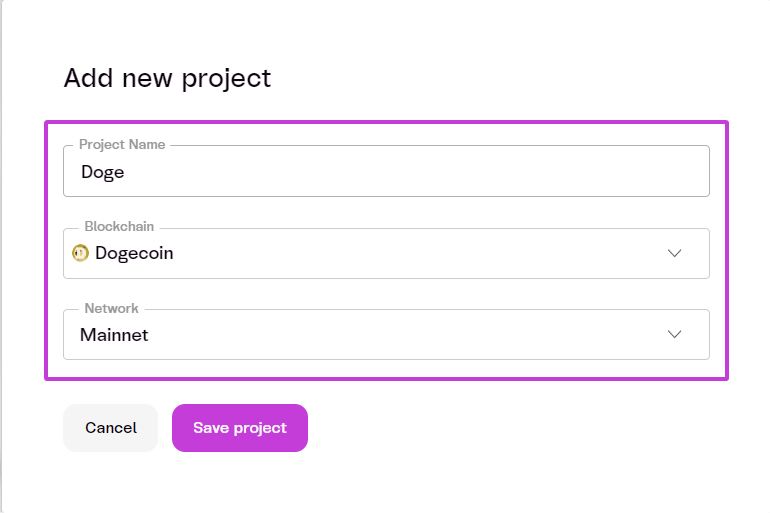
* [Create a Project](/getting-started)
* `Project Name`: \
* `Blockchain`: Doge
* `Network`: Mainnet
 ***
## Steps to Submit an API Request
The API allows applications to list all UTxOs located at a specific address or controlled by a particular script (script pubkey).
In this example, we will use the `Doge Mainnet` as the selected network for our project.
***
### 1. Select the Network
* Ensure your project is configured to use `Doge Mainnet.`
***
### 2. Retrieve Transaction Output
* Use the following endpoint to get a list of all UTxOs that reside at the specified Doge address or script pubkey:
```
/addresses/\:address/utxos
```
***
### 3. Specify Path Parameters
* Include the required path parameters in your request:
| Parameter | Data Type | Description | Required |
| :-------- | :-------- | :--------------------------------------------- | :------- |
| `address` | String | The Doge address or hex-encoded script pubkey. | yes |
***
### 4. Specify Query Parameters (Optional)
* Include **optional** query parameters as needed:
| Parameter | Data Type | Description | Required |
| :---------------------- | :-------- | :--------------------------------------------------------------------------------------------- | :------- |
| `filter_dust` | Boolean | Ignore UTxOs containing less than 100,000 sats. | no |
| `filter_dust_threshold` | Integer | Ignore UTxOs containing less than the specified number of satoshis. | no |
| `count` | any | Maximum number of results per page. | no |
| `order` | any | The order in which the results are sorted (by height at which UTxO was produced). | no |
| `from` | int64 | Return only UTxOs created on or **after** a specific height. | no |
| `to` | int64 | Return only UTxOs created on or **before** a specific height. | no |
| `cursor` | String | Pagination cursor string; use the cursor included in a page of results to fetch the next page. | no |
***
### 5. Send the API Request
* Use cURL or your preferred tool to send the API request:
For this example, we will use:
* `address`: **D9Xni5mwofyjvtzg4Cq7aE5vsDJA3zXQti**
* `count`: **3**
* `order`: **asc**
```sh Curl theme={null}
curl -L -X GET \
-H "Accept: application/json" \
-H "api-key: " \
'https://xdg-mainnet.gomaestro-api.org/v0/addresses/D9Xni5mwofyjvtzg4Cq7aE5vsDJA3zXQti/utxos?count=3&order=asc'
```
***
### 6. Review the Response
The API will return a response like the following:
```json JSON theme={null}
{
"data": [{
"txid": "9921cf6256c0794aabdbd830ecd2cc75526ad3728a0a31ec6eb1cea816162cd8",
"vout": 0,
"address": "D9Xni5mwofyjvtzg4Cq7aE5vsDJA3zXQti",
"script_pubkey": "76a914302b2f9e99b0f1256ea229f1399ee2d38044dce488ac",
"satoshis": "100000",
"confirmations": 247204,
"height": 5144691,
"dunes": [],
"inscriptions": [{
"offset": 0,
"inscription_id": "676bd73b326dc73de502fa78f7ac4994a8054d9df1311e34c5d81f9182b51015i0"
}]
}, {
"txid": "9921cf6256c0794aabdbd830ecd2cc75526ad3728a0a31ec6eb1cea816162cd8",
"vout": 1,
"address": "D9Xni5mwofyjvtzg4Cq7aE5vsDJA3zXQti",
"script_pubkey": "76a914302b2f9e99b0f1256ea229f1399ee2d38044dce488ac",
"satoshis": "100000",
"confirmations": 247204,
"height": 5144691,
"dunes": [],
"inscriptions": [{
"offset": 0,
"inscription_id": "25025072dac60ec88cfe353d2d39448b33b702ce5799383493be797f00e97bf7i0"
}]
}, {
"txid": "9921cf6256c0794aabdbd830ecd2cc75526ad3728a0a31ec6eb1cea816162cd8",
"vout": 2,
"address": "D9Xni5mwofyjvtzg4Cq7aE5vsDJA3zXQti",
"script_pubkey": "76a914302b2f9e99b0f1256ea229f1399ee2d38044dce488ac",
"satoshis": "100000",
"confirmations": 247204,
"height": 5144691,
"dunes": [],
"inscriptions": [{
"offset": 0,
"inscription_id": "e0a9abc190a19e3287874c4244d2f8b20dbe437922c6c9774606d4f71e7bb2d1i0"
}]
}],
"last_updated": {
"block_hash": "a8e23d570387e97591545f98fd1572d4f8787ab180c5c282b76de1949c06c780",
"block_height": 5391895
},
"next_cursor": "AAAAAABOgHNg2CwWFqjOsW7sMQqKctNqUnXM0uww2NurSnnAVmLPIZlgAAAAAg"
}
```
***
### 7. Understanding the Response
| Term | Definition |
| :-------------- | :----------------------------------------------------------------------------------------------------- |
| `txid` | The transaction ID where the UTXO was created. |
| `vout` | The index of the output in the transaction (`txid`). |
| `address` | The Bitcoin address that received the UTXO. |
| `script_pubkey` | The script public key associated with the UTXO, usually in hex format. |
| `satoshis` | The amount of satoshis (smallest unit of Bitcoin) in the UTXO. |
| `confirmations` | The number of confirmations that the UTXO has received on the blockchain. |
| `height` | The block height at which the UTXO was created. |
| `runes` | Additional data related to runes, if any (empty in this response). |
| `inscriptions` | Additional data related to inscriptions, if any (empty in this response). |
| `last_updated` | Information about the last block update related to this request. |
| `block_hash` | The hash of the last block where the UTXOs were updated or retrieved. |
| `block_height` | The height of the last block where the UTXOs were updated or retrieved. |
| `next_cursor` | A cursor for pagination to fetch the next page of results, if applicable (`null `if no further pages). |
## Next Steps
Congrats! Now that you've made your API request, let's [Submit Your First Transaction](/submit-your-first-transaction).
***
## Steps to Submit an API Request
The API allows applications to list all UTxOs located at a specific address or controlled by a particular script (script pubkey).
In this example, we will use the `Doge Mainnet` as the selected network for our project.
***
### 1. Select the Network
* Ensure your project is configured to use `Doge Mainnet.`
***
### 2. Retrieve Transaction Output
* Use the following endpoint to get a list of all UTxOs that reside at the specified Doge address or script pubkey:
```
/addresses/\:address/utxos
```
***
### 3. Specify Path Parameters
* Include the required path parameters in your request:
| Parameter | Data Type | Description | Required |
| :-------- | :-------- | :--------------------------------------------- | :------- |
| `address` | String | The Doge address or hex-encoded script pubkey. | yes |
***
### 4. Specify Query Parameters (Optional)
* Include **optional** query parameters as needed:
| Parameter | Data Type | Description | Required |
| :---------------------- | :-------- | :--------------------------------------------------------------------------------------------- | :------- |
| `filter_dust` | Boolean | Ignore UTxOs containing less than 100,000 sats. | no |
| `filter_dust_threshold` | Integer | Ignore UTxOs containing less than the specified number of satoshis. | no |
| `count` | any | Maximum number of results per page. | no |
| `order` | any | The order in which the results are sorted (by height at which UTxO was produced). | no |
| `from` | int64 | Return only UTxOs created on or **after** a specific height. | no |
| `to` | int64 | Return only UTxOs created on or **before** a specific height. | no |
| `cursor` | String | Pagination cursor string; use the cursor included in a page of results to fetch the next page. | no |
***
### 5. Send the API Request
* Use cURL or your preferred tool to send the API request:
For this example, we will use:
* `address`: **D9Xni5mwofyjvtzg4Cq7aE5vsDJA3zXQti**
* `count`: **3**
* `order`: **asc**
```sh Curl theme={null}
curl -L -X GET \
-H "Accept: application/json" \
-H "api-key: " \
'https://xdg-mainnet.gomaestro-api.org/v0/addresses/D9Xni5mwofyjvtzg4Cq7aE5vsDJA3zXQti/utxos?count=3&order=asc'
```
***
### 6. Review the Response
The API will return a response like the following:
```json JSON theme={null}
{
"data": [{
"txid": "9921cf6256c0794aabdbd830ecd2cc75526ad3728a0a31ec6eb1cea816162cd8",
"vout": 0,
"address": "D9Xni5mwofyjvtzg4Cq7aE5vsDJA3zXQti",
"script_pubkey": "76a914302b2f9e99b0f1256ea229f1399ee2d38044dce488ac",
"satoshis": "100000",
"confirmations": 247204,
"height": 5144691,
"dunes": [],
"inscriptions": [{
"offset": 0,
"inscription_id": "676bd73b326dc73de502fa78f7ac4994a8054d9df1311e34c5d81f9182b51015i0"
}]
}, {
"txid": "9921cf6256c0794aabdbd830ecd2cc75526ad3728a0a31ec6eb1cea816162cd8",
"vout": 1,
"address": "D9Xni5mwofyjvtzg4Cq7aE5vsDJA3zXQti",
"script_pubkey": "76a914302b2f9e99b0f1256ea229f1399ee2d38044dce488ac",
"satoshis": "100000",
"confirmations": 247204,
"height": 5144691,
"dunes": [],
"inscriptions": [{
"offset": 0,
"inscription_id": "25025072dac60ec88cfe353d2d39448b33b702ce5799383493be797f00e97bf7i0"
}]
}, {
"txid": "9921cf6256c0794aabdbd830ecd2cc75526ad3728a0a31ec6eb1cea816162cd8",
"vout": 2,
"address": "D9Xni5mwofyjvtzg4Cq7aE5vsDJA3zXQti",
"script_pubkey": "76a914302b2f9e99b0f1256ea229f1399ee2d38044dce488ac",
"satoshis": "100000",
"confirmations": 247204,
"height": 5144691,
"dunes": [],
"inscriptions": [{
"offset": 0,
"inscription_id": "e0a9abc190a19e3287874c4244d2f8b20dbe437922c6c9774606d4f71e7bb2d1i0"
}]
}],
"last_updated": {
"block_hash": "a8e23d570387e97591545f98fd1572d4f8787ab180c5c282b76de1949c06c780",
"block_height": 5391895
},
"next_cursor": "AAAAAABOgHNg2CwWFqjOsW7sMQqKctNqUnXM0uww2NurSnnAVmLPIZlgAAAAAg"
}
```
***
### 7. Understanding the Response
| Term | Definition |
| :-------------- | :----------------------------------------------------------------------------------------------------- |
| `txid` | The transaction ID where the UTXO was created. |
| `vout` | The index of the output in the transaction (`txid`). |
| `address` | The Bitcoin address that received the UTXO. |
| `script_pubkey` | The script public key associated with the UTXO, usually in hex format. |
| `satoshis` | The amount of satoshis (smallest unit of Bitcoin) in the UTXO. |
| `confirmations` | The number of confirmations that the UTXO has received on the blockchain. |
| `height` | The block height at which the UTXO was created. |
| `runes` | Additional data related to runes, if any (empty in this response). |
| `inscriptions` | Additional data related to inscriptions, if any (empty in this response). |
| `last_updated` | Information about the last block update related to this request. |
| `block_hash` | The hash of the last block where the UTXOs were updated or retrieved. |
| `block_height` | The height of the last block where the UTXOs were updated or retrieved. |
| `next_cursor` | A cursor for pagination to fetch the next page of results, if applicable (`null `if no further pages). |
## Next Steps
Congrats! Now that you've made your API request, let's [Submit Your First Transaction](/submit-your-first-transaction).