> ## Documentation Index
> Fetch the complete documentation index at: https://docs.gomaestro.org/llms.txt
> Use this file to discover all available pages before exploring further.
# Query Cardano UTxOs
> Tutorial guide to query Cardano UTxO information by address using Maestro's Blockchain Indexer API for wallet and dApp development.
**Get UTxO details on Cardano**
In this guide, you will learn to query Cardano and extract UTxO information by leveraging the [UTxOs at an Address](/cardano/blockchain-indexer-api/addresses/utxos-at-an-address) endpoint.
# Prerequisites
Before submitting an API request, ensure you have completed the following:
* [Create an Account](https://dashboard.gomaestro.org)
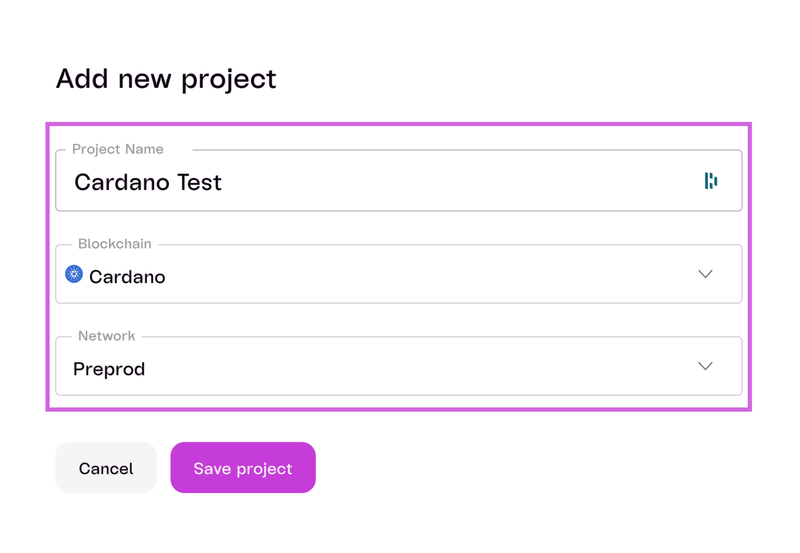
* [Create a Project](/getting-started#)
* `Project Name`: \
* `Blockchain`: Cardano
* `Network`: Preprod
 # Steps to Submit an API Request
The API allows applications to retrieve detailed information on UTxOs controlled by a specific address.
In this example, we will use the `Cardano Preprod` as the selected network for our project.
***
## 1. Select the Network
* Ensure your project is configured to use `Cardano Preprod`**.**
***
## 2. Retrieve Transaction Output
* Use the following endpoint to get a list of all UTxOs that reside at the specified Cardano address or script pubkey:
```
/addresses/\:address/utxos
```
***
## 3. Specify Path Parameters
* Include the required path parameters in your request:
| Parameter | Data Type | Description | Required |
| :-------- | :-------- | :------------------------------------------- | :------- |
| `address` | String | The address in Bech32 format to query UTxOs. | yes |
***
## 4. Specify Query Parameters (Optional)
* Include **optional** query parameters as needed:
| Parameter | Data Type | Description | Required |
| :--------------- | :-------- | :---------------------------------------------------------------------------------------------------------------- | :------- |
| `asset` | String | Returns only UTxOs containing a specific asset (formatted as concatenation of hex-encoded policy and asset name). | no |
| `resolve_datums` | Boolean | If `true`, include corresponding datums for datum hashes in the response. | no |
| `with_cbor` | Boolean | If `true`, includes CBOR encodings of transaction outputs in the response. | no |
| `count` | Integer | Maximum number of results to return per page. | no |
| `order` | String | Sort order for results (`asc` for ascending or `desc` for descending). | no |
| `from` | int64 | Returns only UTxOs created on or **after** a specific slot number. | no |
| `to` | int64 | Returns only UTxOs created on or **before** a specific slot number. | no |
| `cursor` | String | Pagination cursor string to fetch the next page of results. | |
***
## 5. Send the API Request
* Use cURL or your preferred tool to send the API request:
For this example, we will use:
* `address`: addr\_test1wzdtu0djc76qyqak9cj239udezj2544nyk3ksmfqvaksv7c9xanpg
* `order`: asc
```sh Curl theme={null}
curl -L -X GET \
-H "Accept: application/json" \
-H "api-key: " \
'https://preprod.gomaestro-api.org/v1/addresses/addr_test1wzdtu0djc76qyqak9cj239udezj2544nyk3ksmfqvaksv7c9xanpg/utxos?order=asc'
```
***
## 6. Review the Response
The API will return a response like the following:
```json JSON theme={null}
{
"data": [
{
"tx_hash": "6c1bbfff3b22f189b325fee3f51eceacf13090aae895e912c56ec615efacb3e0",
"index": 0,
"slot": 57115432,
"assets": [
{
"unit": "lovelace",
"amount": 1224040
},
{
"unit": "0c64d6d0371d11185aae649cf3a169040e94214137137b531ebb16c2446a65644f7261636c654e4654",
"amount": 1
}
],
"address": "addr_test1wzdtu0djc76qyqak9cj239udezj2544nyk3ksmfqvaksv7c9xanpg",
"datum": {
"type": "hash",
"hash": "065191b95752a6ecca365cfd19a68f8968215596fbfc94f1fbc8ab0053d9110f",
"bytes": null,
"json": null
},
"reference_script": null,
"txout_cbor": null
}
],
"last_updated": {
"timestamp": "2024-09-11 23:22:19",
"block_hash": "053a9d8a812db204a32ddbb90834128ec8f94a3de2c990caa413dd55ae30d5c1",
"block_slot": 70413739
},
"next_cursor": null
}
```
***
## 7. Understanding the Response
| Term | Definition |
| :------------------------ | :------------------------------------------------------------------------------- |
| `tx_hash` | The unique identifier of the transaction that created this UTXO. |
| `index` | The output index of this UTXO within the transaction. |
| `slot` | The slot number at which this UTXO was created. |
| `assets` | A list of assets contained in this UTXO, including their unit (type) and amount. |
| `address` | The address associated with this UTXO. |
| `datum.type` | The type of datum associated with this UTXO (e.g., "hash"). |
| `datum.hash` | The hash of the datum associated with this UTXO. |
| `datum.bytes` | The byte representation of the datum (if available), otherwise `null`. |
| `datum.json` | The JSON representation of the datum (if available), otherwise `null`. |
| `reference_script` | A reference to a script associated with this UTXO, if any, otherwise `null`. |
| `txout_cbor` | The CBOR encoding of the transaction output, if available, otherwise `null`. |
| `last_updated.timestamp` | The timestamp indicating when the data was last updated. |
| `last_updated.block_hash` | The hash of the block where the UTXO data was last updated. |
| `last_updated.block_slot` | The slot number of the block where the UTXO data was last updated. |
| `next_cursor` | A pointer to the next set of data if there are more results; otherwise `null`. |
**Next Steps**
Congrats! Now that you've made your API request, let's [Submit Your First Transaction](/submit-your-first-transaction).
# Steps to Submit an API Request
The API allows applications to retrieve detailed information on UTxOs controlled by a specific address.
In this example, we will use the `Cardano Preprod` as the selected network for our project.
***
## 1. Select the Network
* Ensure your project is configured to use `Cardano Preprod`**.**
***
## 2. Retrieve Transaction Output
* Use the following endpoint to get a list of all UTxOs that reside at the specified Cardano address or script pubkey:
```
/addresses/\:address/utxos
```
***
## 3. Specify Path Parameters
* Include the required path parameters in your request:
| Parameter | Data Type | Description | Required |
| :-------- | :-------- | :------------------------------------------- | :------- |
| `address` | String | The address in Bech32 format to query UTxOs. | yes |
***
## 4. Specify Query Parameters (Optional)
* Include **optional** query parameters as needed:
| Parameter | Data Type | Description | Required |
| :--------------- | :-------- | :---------------------------------------------------------------------------------------------------------------- | :------- |
| `asset` | String | Returns only UTxOs containing a specific asset (formatted as concatenation of hex-encoded policy and asset name). | no |
| `resolve_datums` | Boolean | If `true`, include corresponding datums for datum hashes in the response. | no |
| `with_cbor` | Boolean | If `true`, includes CBOR encodings of transaction outputs in the response. | no |
| `count` | Integer | Maximum number of results to return per page. | no |
| `order` | String | Sort order for results (`asc` for ascending or `desc` for descending). | no |
| `from` | int64 | Returns only UTxOs created on or **after** a specific slot number. | no |
| `to` | int64 | Returns only UTxOs created on or **before** a specific slot number. | no |
| `cursor` | String | Pagination cursor string to fetch the next page of results. | |
***
## 5. Send the API Request
* Use cURL or your preferred tool to send the API request:
For this example, we will use:
* `address`: addr\_test1wzdtu0djc76qyqak9cj239udezj2544nyk3ksmfqvaksv7c9xanpg
* `order`: asc
```sh Curl theme={null}
curl -L -X GET \
-H "Accept: application/json" \
-H "api-key: " \
'https://preprod.gomaestro-api.org/v1/addresses/addr_test1wzdtu0djc76qyqak9cj239udezj2544nyk3ksmfqvaksv7c9xanpg/utxos?order=asc'
```
***
## 6. Review the Response
The API will return a response like the following:
```json JSON theme={null}
{
"data": [
{
"tx_hash": "6c1bbfff3b22f189b325fee3f51eceacf13090aae895e912c56ec615efacb3e0",
"index": 0,
"slot": 57115432,
"assets": [
{
"unit": "lovelace",
"amount": 1224040
},
{
"unit": "0c64d6d0371d11185aae649cf3a169040e94214137137b531ebb16c2446a65644f7261636c654e4654",
"amount": 1
}
],
"address": "addr_test1wzdtu0djc76qyqak9cj239udezj2544nyk3ksmfqvaksv7c9xanpg",
"datum": {
"type": "hash",
"hash": "065191b95752a6ecca365cfd19a68f8968215596fbfc94f1fbc8ab0053d9110f",
"bytes": null,
"json": null
},
"reference_script": null,
"txout_cbor": null
}
],
"last_updated": {
"timestamp": "2024-09-11 23:22:19",
"block_hash": "053a9d8a812db204a32ddbb90834128ec8f94a3de2c990caa413dd55ae30d5c1",
"block_slot": 70413739
},
"next_cursor": null
}
```
***
## 7. Understanding the Response
| Term | Definition |
| :------------------------ | :------------------------------------------------------------------------------- |
| `tx_hash` | The unique identifier of the transaction that created this UTXO. |
| `index` | The output index of this UTXO within the transaction. |
| `slot` | The slot number at which this UTXO was created. |
| `assets` | A list of assets contained in this UTXO, including their unit (type) and amount. |
| `address` | The address associated with this UTXO. |
| `datum.type` | The type of datum associated with this UTXO (e.g., "hash"). |
| `datum.hash` | The hash of the datum associated with this UTXO. |
| `datum.bytes` | The byte representation of the datum (if available), otherwise `null`. |
| `datum.json` | The JSON representation of the datum (if available), otherwise `null`. |
| `reference_script` | A reference to a script associated with this UTXO, if any, otherwise `null`. |
| `txout_cbor` | The CBOR encoding of the transaction output, if available, otherwise `null`. |
| `last_updated.timestamp` | The timestamp indicating when the data was last updated. |
| `last_updated.block_hash` | The hash of the block where the UTXO data was last updated. |
| `last_updated.block_slot` | The slot number of the block where the UTXO data was last updated. |
| `next_cursor` | A pointer to the next set of data if there are more results; otherwise `null`. |
**Next Steps**
Congrats! Now that you've made your API request, let's [Submit Your First Transaction](/submit-your-first-transaction).