> ## Documentation Index
> Fetch the complete documentation index at: https://docs.gomaestro.org/llms.txt
> Use this file to discover all available pages before exploring further.
# MCP: Interact with Bitcoin via an LLM
> Tutorial guide to use Model Context Protocol (MCP) for Bitcoin blockchain interactions through AI language models and Maestro APIs.
The [Model Context Protocol (MCP)](https://modelcontextprotocol.io/introduction) is an open standard that enables developers to build secure, two-way connections between their data sources and AI-powered tools.
For additional information about MCP, its origins, and [Claude](https://claude.ai), read more from the creators, [Anthropic](https://www.anthropic.com/news/model-context-protocol).
***
The Maestro MCP server allows for interacting with Bitcoin through the interface of an LLM client.
Maestro MCP transforms how LLMs engage with the Bitcoin network, turning them into powerful, on-chain agents. Bridging Claude (or any LLM client) with our MCP server enables the LLM to query blocks, inspect transactions, analyze addresses, and even take action on behalf of the user.
This server functionality provides the LLM with a set of tools for exploring blocks, transactions, addresses, and other aspects of the Bitcoin blockchain, allowing the LLM to not only retrieve and make infereances on on-chain data, but also to take action on behalf of the user; ie, serve as an [*agent*](https://github.com/resources/articles/ai/what-are-ai-agents).
In this tutorial, we will use Claude Desktop client alongside the **hosted** Maestro MCP server to communicate with the Bitcoin network and start making intelligent, on-chain requests.
*For more client examples, see our *Maestro MCP client examples repo* and refer to our *local setup* if you'd like to understand how to connect Claude Desktop to a locally-running MCP server.*
Some of the MCP server functionality will not work if you are using the **Artist tier**; a **Composer-level subscription or higher** will be needed to access the more advanced MCP features, such as those related to Mempool API activities.
Consult the [pricing page](https://www.gomaestro.org/pricing) for more information.
***
## Requirements
* Obtain a Maestro API key
## Configuration
1. Download Claude Desktop [here](https://claude.ai/download).
2. Open Claude Desktop settings.
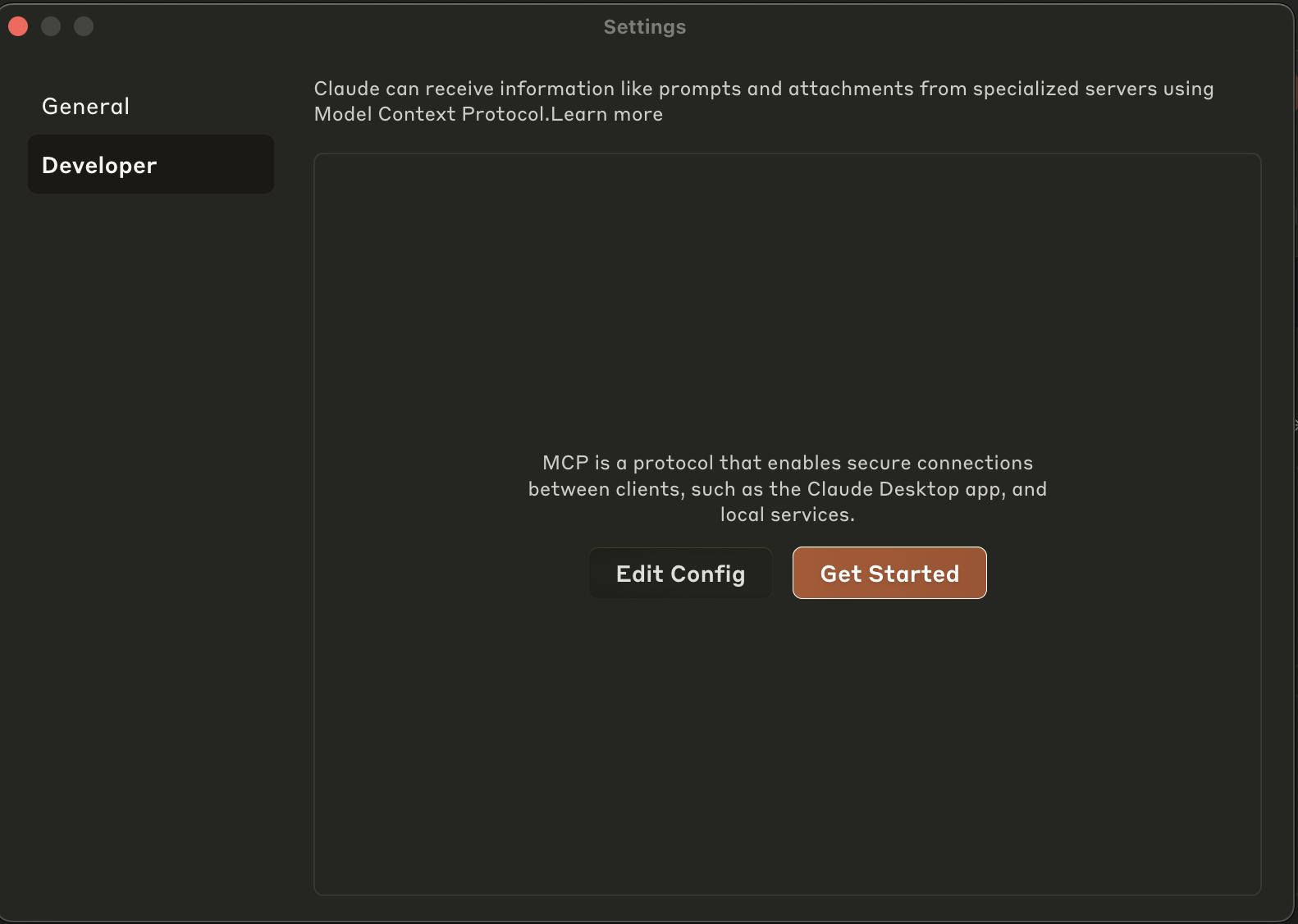 3. Select `Edit Config`.
4. Open the Claude Desktop App configuration file located at:
* **macOS:** `~/Library/Application Support/Claude/claude_desktop_config.json`
* **Windows:** `%APPDATA%\Claude\claude_desktop_config.json`
Copy the below contents into this config file.
Be sure to replace the `
```json claude_desktop_config.json theme={null}
{
"mcpServers": {
"maestro-mcp-server": {
"command": "npx",
"args": [
"-y",
"mcp-remote",
"https://xbt-mainnet.gomaestro-api.org/v0/mcp",
"--header",
"Authorization:${AUTH_HEADER}",
"--transport",
"http-only"
],
"env": {
"AUTH_HEADER": "Bearer "
}
}
}
}
```
## Usage
* Restart Claude after any change to either the `claude_desktop_config.json` or the source code.
1. Launch Claude Desktop.
2. Locate the tools icon.
3. Select `Edit Config`.
4. Open the Claude Desktop App configuration file located at:
* **macOS:** `~/Library/Application Support/Claude/claude_desktop_config.json`
* **Windows:** `%APPDATA%\Claude\claude_desktop_config.json`
Copy the below contents into this config file.
Be sure to replace the `
```json claude_desktop_config.json theme={null}
{
"mcpServers": {
"maestro-mcp-server": {
"command": "npx",
"args": [
"-y",
"mcp-remote",
"https://xbt-mainnet.gomaestro-api.org/v0/mcp",
"--header",
"Authorization:${AUTH_HEADER}",
"--transport",
"http-only"
],
"env": {
"AUTH_HEADER": "Bearer "
}
}
}
}
```
## Usage
* Restart Claude after any change to either the `claude_desktop_config.json` or the source code.
1. Launch Claude Desktop.
2. Locate the tools icon.
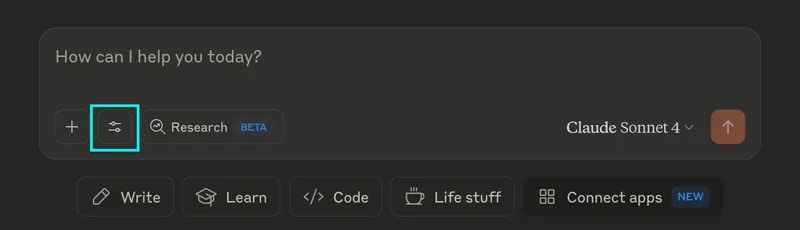 3. Select `maestro-mcp-server`.
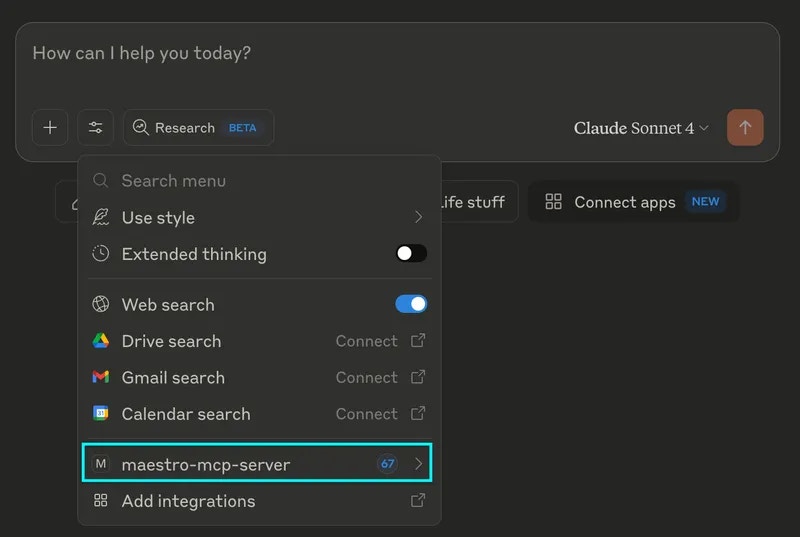 4. View available MCP tools.
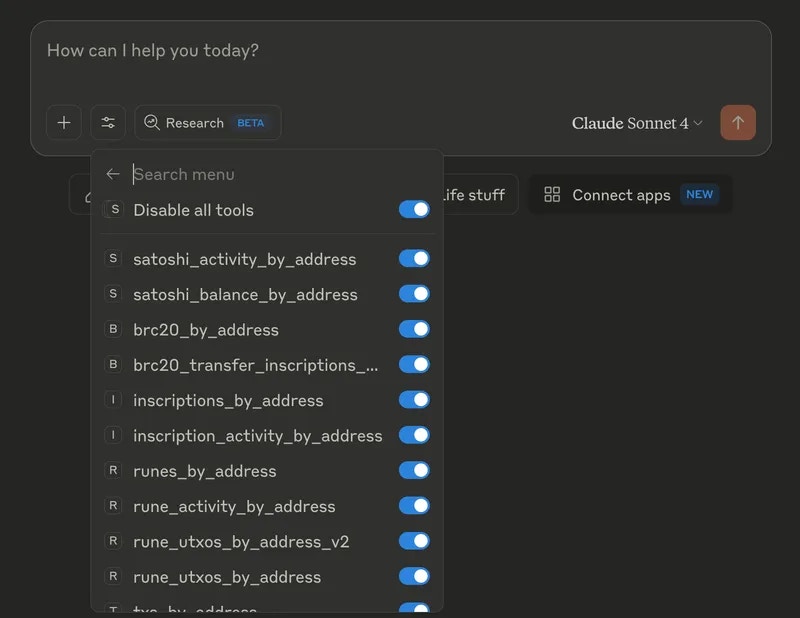 5. Prompt Claude.
*Examples*:
* "Fetch the latest Bitcoin block"
* "Get the blockchain info for Bitcoin"
* "Fetch all UTXOs for this address: `bc1prqpwzqqcfzlrtjz3at5kuz4zevqsmvxc5xjuzvg58y48leu67x0q0kvy85`"
* "Fetch metaprotocol activity for this address:
`bc1qcx7ys0ahvtfqcc63sfn6axls0qrhkadnslpd94`"
5. Prompt Claude.
*Examples*:
* "Fetch the latest Bitcoin block"
* "Get the blockchain info for Bitcoin"
* "Fetch all UTXOs for this address: `bc1prqpwzqqcfzlrtjz3at5kuz4zevqsmvxc5xjuzvg58y48leu67x0q0kvy85`"
* "Fetch metaprotocol activity for this address:
`bc1qcx7ys0ahvtfqcc63sfn6axls0qrhkadnslpd94`"
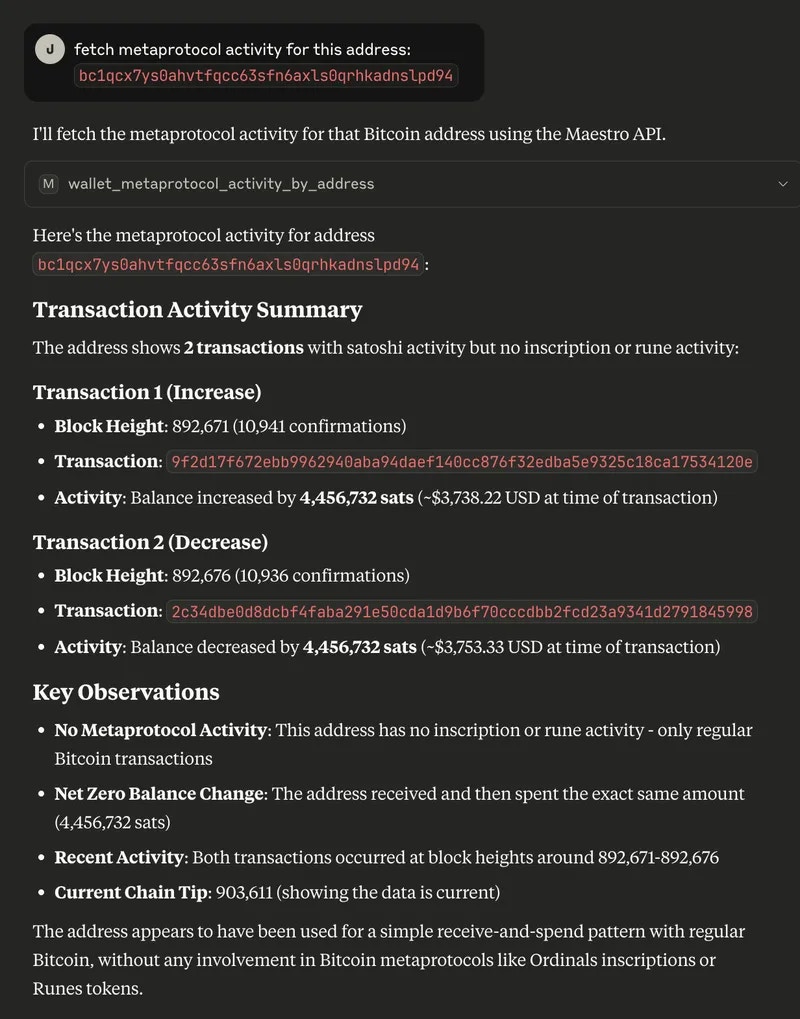 You may need to approve the request within Claude.
***
## 🎉 You’re Done!
You now have communicated with the Bitcoin Network via the Maestro MCP. This is just the beginning of a new development frontier- one where creativity reigns and the only limitation to building new applications leveraging Bitcoin data is your imagination.
Be sure to review Maestro's rate limits and [pricing tiers](https://www.gomaestro.org/pricing) to select the plan that best fits your application's needs.
***
## Debugging
The following tools are useful for debugging a locally-running MCP server.
* inspector
* mcp-cli
**Support**
If you are experiencing any trouble with the above, [open an issue](https://github.com/maestro-org/maestro-mcp/issues/new) or reach out on Discord.
You may need to approve the request within Claude.
***
## 🎉 You’re Done!
You now have communicated with the Bitcoin Network via the Maestro MCP. This is just the beginning of a new development frontier- one where creativity reigns and the only limitation to building new applications leveraging Bitcoin data is your imagination.
Be sure to review Maestro's rate limits and [pricing tiers](https://www.gomaestro.org/pricing) to select the plan that best fits your application's needs.
***
## Debugging
The following tools are useful for debugging a locally-running MCP server.
* inspector
* mcp-cli
**Support**
If you are experiencing any trouble with the above, [open an issue](https://github.com/maestro-org/maestro-mcp/issues/new) or reach out on Discord.