> ## Documentation Index
> Fetch the complete documentation index at: https://docs.gomaestro.org/llms.txt
> Use this file to discover all available pages before exploring further.
# Upgrade
> Guide to upgrade your Maestro subscription plan with more credits, flexible pay-as-you-go options, and immediate plan switching.
**Upgrade Your Subscription**
Easily upgrade your subscription plan to better suit your usage needs directly from the Maestro Dashboard. Whether you need more credits or prefer a flexible, pay-as-you-go option, you can switch plans at any time with immediate effect. This guide will walk you through the process of upgrading your subscription and explain the available options.
***
## Prerequisites
Before managing your subscription, ensure you have completed the following:
* [Create an Account](https://dashboard.gomaestro.org) if you don’t already have one
***
### 1. How to Upgrade
On the **Subscription Details** page, click `Upgrade `to explore different subscription options.
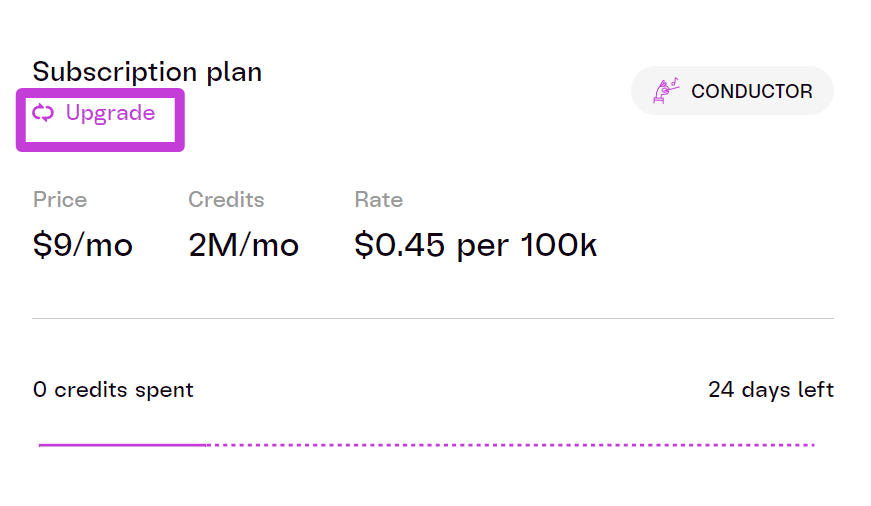 You can choose from:
1. **Monthly Capped Plans**: Suitable for limited use, with a fixed amount of credits each month.
2. **Pay-As-You-Go Plans**: Best for continuous use, charging based on actual usage without credit limits.
Changes to your \*\*plan take effect immediately, \*\*and billing will be adjusted accordingly. ***You can switch between plans at any time.***
For any issues with billing, please reach out to **Support****.**
You can choose from:
1. **Monthly Capped Plans**: Suitable for limited use, with a fixed amount of credits each month.
2. **Pay-As-You-Go Plans**: Best for continuous use, charging based on actual usage without credit limits.
Changes to your \*\*plan take effect immediately, \*\*and billing will be adjusted accordingly. ***You can switch between plans at any time.***
For any issues with billing, please reach out to **Support****.**